
1. Go to the Rota Section of the OneCare Platform
2. Go to Availability tab
3. Use the search bar at the top-left to find the desired staff member by name.
4. Click into the rota to open the Availability pop-up.:
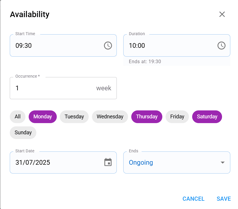
5. Enter the staff member’s available times and select the specific days they are available.
6. Click Save to confirm and apply the changes.
📝 Staff availability can be edited at any time—whether for daily adjustments or longer-term planning.