
1. Go to the Rota Section of the OneCare Platform.
2. In the People tab, use the search bar to find the relevant person and review their scheduled visits to ensure all details are correct.
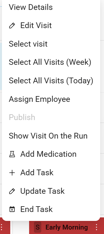
3.Click the three vertical dots (⋮) on the visit card and select Add Medication from the list:
4. Enter the medication details, specify the level of criticality, and indicate the days it should be administered. Once all information is complete, click Save to add the medication to the visit.
- Make sure to select the correct CSA visits that this medication should be linked to;
- Specify whether the medication is to be administered on a daily or weekly schedule;
- If the medication is time critical, clearly indicate the allowed time tolerance and define the specific time window for administration;
- If the same medication is required for multiple visits, use the Add to additional visits button at the bottom of the pop-up screen to associate it with additional appointments as needed
📝 This ensures carers are clearly informed of any medication responsibilities during their visits.