1. Select Settings in the top right corner of the screen.
2. Choose Branches and Areas.
3. Click Add Branches and Areas button at the top right.
4. Enter the details for each branch and the associated area(s) you wish to create. Each branch can contain several areas.
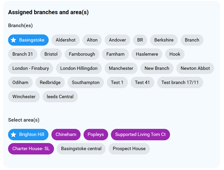
Please note: After adding a branch and its areas, staff must assign themselves to the relevant branches and areas in the Job Details section (Staff → Job Details → Assigned Branches and Areas) to access clients and team members linked to those areas.